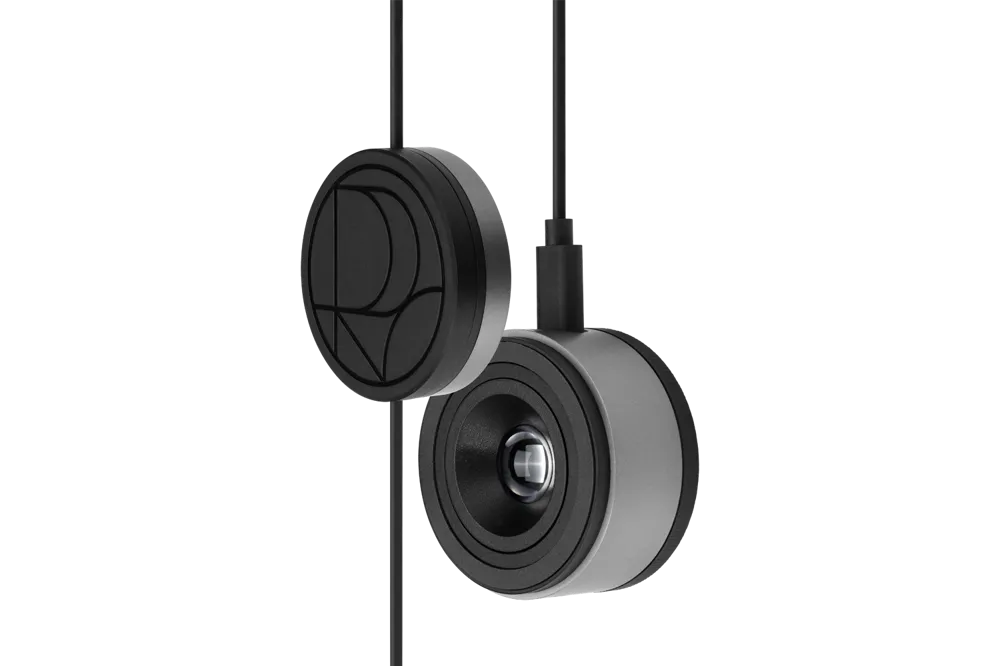
3-in-1 creator tool – A compact device integrating a monitor OSD controller, a professional monitor calibrator, and creative app control dial functions.
Official Demo Video: From Calibration to Creation – ProArt CaliContrO MCA02 (YouTube)
ASUS
3-in-1 creator tool – A compact device integrating a monitor OSD controller, a professional monitor calibrator, and creative app control dial functions.
Official Demo Video: From Calibration to Creation – ProArt CaliContrO MCA02 (YouTube)
For creators involved in photo and video editing, color accuracy and work efficiency are critical.
However, accurately calibrating monitor colors requires periodic calibration with separate calibrator devices like i1Display or Spyder. This process is cumbersome, leading some to skip it altogether or work with inaccurate colors. Additionally, using apps like Premiere and Photoshop requires fine-tuning (brush size, timeline scrubbing, etc.) with a keyboard and mouse, which is inefficient, leading some to use additional controllers like Loupedeck or Studio Dial.
In short, adjusting screen settings is inconvenient with monitor buttons, screen calibration is separate, and app shortcut operations require separate devices and programs, complicating the workspace and disrupting the workflow.
ProArt CaliContrO performs three roles with a single device: monitor control + color calibration + app hotkey dial.
First, the 5-way navigator and shortcut keys on the top of the device allow you to instantly adjust monitor OSD settings (brightness, contrast, input switching, etc.), eliminating the need to fumble with monitor buttons.
Second, the built-in professional-grade colorimeter sensor enables hardware calibration of the monitor – precisely measuring SDR and HDR displays up to a brightness range of 10,000 nits. When used with ASUS ProArt monitors, it supports hardware calibration that writes the LUT directly to the monitor. Unlike general calibrators that struggle with HDR high-brightness measurement, this product can handle it, making it suitable for professional HDR work.
Third, the side rotary dial and buttons provide ASUS Dial functionality, allowing you to customize and execute brush size adjustments, zoom in/out, timeline navigation, etc., in major creative software such as Photoshop and Lightroom. In Windows environments, it also supports the MS Surface Dial protocol for use in a wide range of apps.
This integration solves both monitor color management and app control with a single device on the desk, and its portable size allows you to carry it to various work sites and maintain the same environment. The price is also similar to or cheaper than buying separate devices at around $249, which is considered economical.
Individual creators in the video and image fields (B2C prosumers)are the main customers.
Photographers, video editors, graphic designers, and other solo creators for whom color accuracy and work speed are important can improve their work efficiency with this device. In addition, studios and production companies (B2B) can purchase it for their employees to standardize work and manage quality (unify monitor colors). Since ASUS also provides it as a bundle with high-end ProArt monitors, it is expected that professional monitor buyers will naturally adopt this product together.
This is a market limited to professional and hobbyist creators with clear needs, rather than general consumers.
The scope of this product's application is limited to the creative work field. However, its global scale is quite large, with considerable demand when including professionals and amateurs in the photo/video fields. Since it can be sold worldwide without national regulatory restrictions (only the terminal connection is USB), supply is easy through ASUS's global distribution network. Expansion to other industries is limited, but in the future, modified applications can be considered for fields requiring precise calibration, such as medical monitors.
Basically, if both Windows/Mac support is possible, the Apple user base can also be absorbed, and if software expansion is achieved by increasing dial compatibility with more apps, the value will be further enhanced.
Overall, there is a possibility of focusing on a professional niche market and establishing itself as a standard equipment within it.
It has been recognized for its novelty as a professional creator tool by winning the CES Innovation Award.
Media outlets such as TechRadar reported that "ASUS has released a tool that makes creative work easier" and highlighted the 3-in-1 integration idea in particular. At the CES site, this device was demonstrated at the high-end monitor booth, receiving positive feedback as *"the unsung hero of this show."* Experts were amazed by the performance exceeding existing colorimeters, such as 10000 nit HDR calibration support, and praised the practical innovation of *"consolidating devices on the creator's desk."
In addition, the price is relatively reasonable, so there is an expectation that it will become an essential item in the creative community after its release.
Meanwhile, some reviews mentioned that *"it is ultimately optimized for existing ASUS ProArt equipment users, so versatility is limited,"* but this refers to some users such as Apple users and is not a major criticism. In general, the completeness is high compared to the function, and the specific usage scenario is clear, so there are no elements of overestimation and the evaluation is entirely positive.
📌 A solution limited to a specific niche – A great tool for creators to innovate their working environment, but the market itself is limited to a professional field, so it is a product that will have a firm position in that niche rather than the general public.
The award list data is based on the official CES 2026 website, and detailed analysis content is produced by USLab.ai. For content modification requests or inquiries, please contact contact@uslab.ai. Free to use with source attribution (USLab.ai) (CC BY)